Bell Software: Enhancing School Intercom Systems
Stand Alone Bell Software

Experience simple, reliable bell scheduling with our school bell software that requires no dedicated computer. Program directly from the touchscreen or over the network for an easy intercom system upgrade, or use our VoIP announcement system for enhanced communication.
Intercom System Upgrade

Our service facilitates an intercom system upgrade, allowing you to adapt your current system so that all-call announcements can be made from any VoIP phone using our advanced VoIP announcement system, along with school bell software integration.
Deluxe Bell Software
Deluxe Bell Software

This intercom system upgrade runs from a dedicated networked computer, providing features like custom bell tones, music, announcements using a VoIP announcement system, and more advanced scheduling with school bell software.
Stand Alone Bell Software
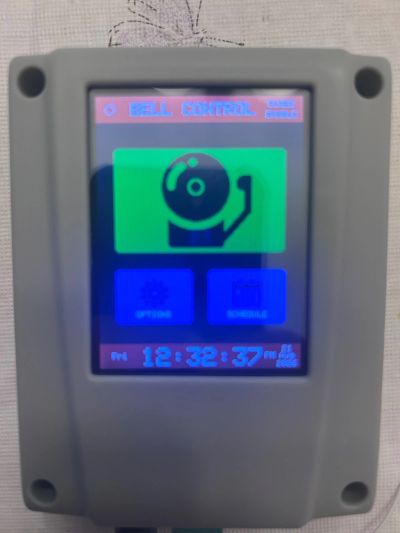
School Bell Controller Setup & Programming
Our school bell software enhances your intercom system upgrade by providing reliable, automatic bell scheduling for K-12 schools, campuses, offices, and educational facilities. Bell schedules can be programmed directly from the touchscreen or managed through a secure browser-based interface from an authorized computer, tablet, or phone, making it an efficient VoIP announcement system solution.
Automatic School Bell Scheduling
Utilize our school bell software to create daily schedules, including class change bells, start and dismissal bells, testing schedules, early-release schedules, and other timed events. With an intercom system upgrade, bell times can be easily adjusted as school schedules change without the need to replace existing intercom or PA equipment. Consider integrating a VoIP announcement system for enhanced communication.
Network & Time Synchronization
The controller can connect to the school network for automatic time synchronization and convenient browser-based programming, essential for any intercom system upgrade. Once configured, the system operates independently without the need for a dedicated computer, allowing for seamless integration with school bell software and a VoIP announcement system for regular announcements.
Holidays & No-Bell Days
By implementing an intercom system upgrade, schools can use school bell software to program holidays, testing days, teacher workdays, and breaks in advance. This ensures that the scheduled bells remain silent through a VoIP announcement system when students are not on campus.
School Bell System Installation & Support
School Intercom & Sound Services offers comprehensive school bell system installation, programming, upgrades, troubleshooting, and technical support for schools in San Antonio and across Texas. Our innovative bell controllers work seamlessly with many existing intercom system upgrades, and can integrate with a variety of school intercom, paging, and PA systems, as well as our advanced school bell software and VoIP announcement system.